Canva Pro with HC
Written By hillcollege
Last updated 11 months ago

As part of the Hill College benefits program, we offer free Canva pro to all members of the Hill College community. You don't have to be an enrolled student or staff member to be allowed, and no sign up or anything is required.
If you already have an account, head to canva.hillcollege.org and you will be directed to the join page where you can login to your account and join the "team".
Recently, due to publicity of random people joining the Hill College Canva Pro, we have had to carefully monitor those who are using the benefit. When attempting to head to canva.hillcollege.org, you will be directed to a form where you quickly enter your details to obtain the link.
FAQ
Where are all my old work/projects?
Where are all my old work/projects?
Any work that you created before joining the Hill College "team" can be found in the projects page of your personal/school/work account.
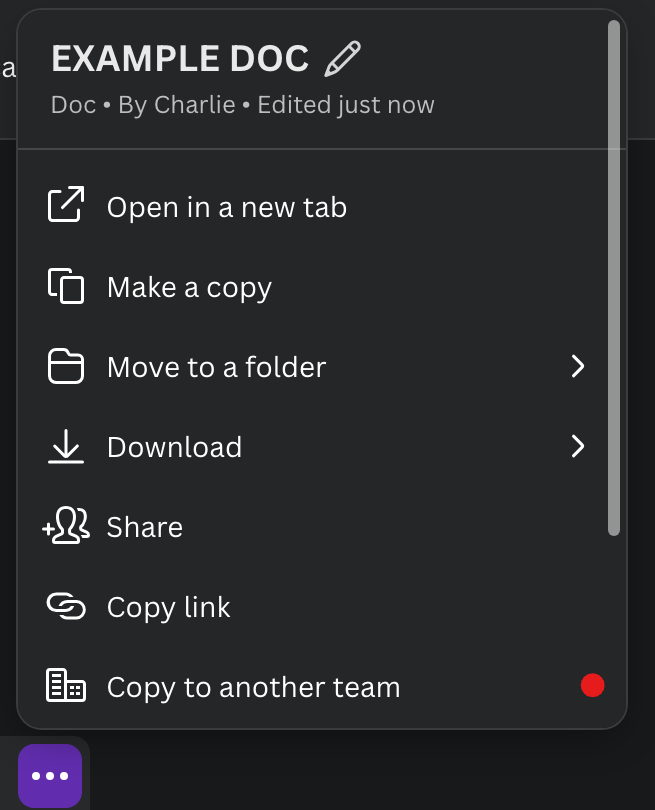
To transfer projects from your personal account to the Hill College team, hover over the project and click the three dots. Then click "Copy to another team" and select "Hill College".
Now your project will appear in the HC team which Canva Pro will apply to this project.
Why can I still not access Canva Pro after joining?
Why can I still not access Canva Pro after joining?
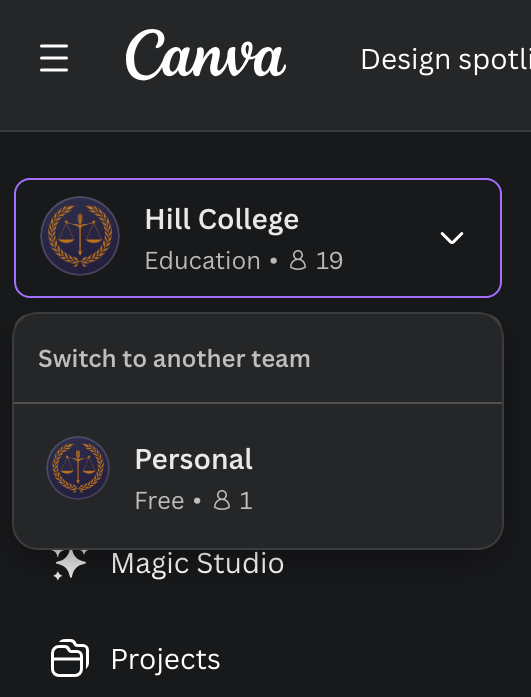
If Canva Pro benefits are still not applying after you have joined, make sure you have switched to the Hill College team. To check if you are on the team or not, on the left side of your screen, check to see if it says "Personal" or "Hill College".
If you are on "Personal" team, just switch to Hill College and transfer any file to the Hill College team (see above FAQ). If you are on the Hill College team, then contact us and we will work with you and Canva to solve the issue.
Can Hill College access or see my files/projects?
Can Hill College access or see my files/projects?
No, Hill College can never access any of your files. Therefore, if you accidently loose or delete anything, we cannot retrieve it.
Was this helpful?
Still need help? Ask the team