Email Quarantine Issues
Written By hillcollege
Last updated 7 months ago
If you aren’t receivig Hill College emails when you know you are supposed to, like account emails, you may need to check your email quarantine to see if it has been put on hold there. Outlook doesn’t always like Hill College emails, as it can be flagged as phishing/scam emails - but we can ensure you that we are not.
If you haven’t already, we reccomend that you visit our Safe Sender Optimization article to ensure future emails don’t get flagged.
Step Guide
Head to Microsoft Security - Quarantine in your web browser
Ensure that your filters are set to at least 30 days (or longer, if needed) and “Show all senders”

Check if any emails are listed under Hill College - if you have multiple emails, check each one to find the one from Hill College with @hillcollege.org
Check the email to ensure it is safe and that it is from legit Hill College by previewing the message
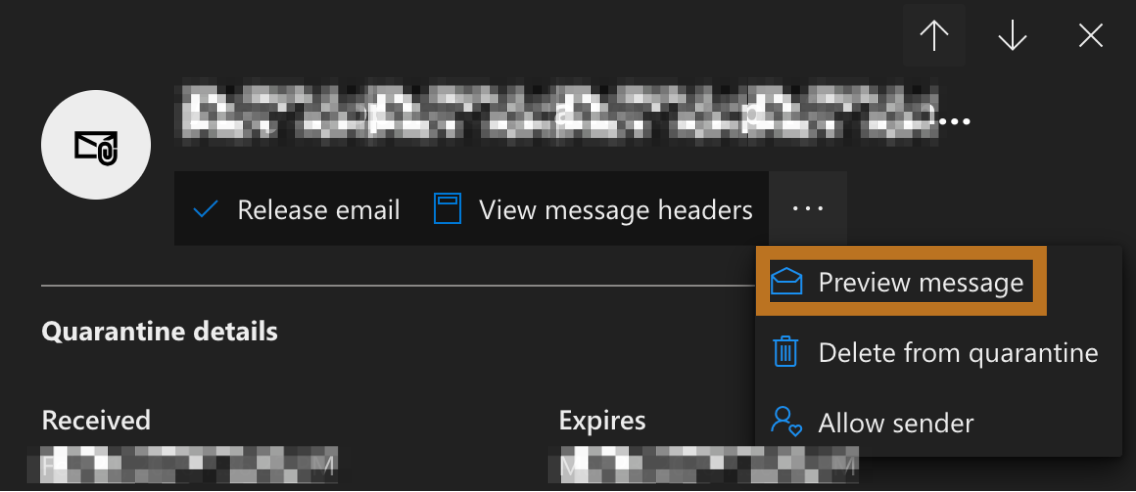
If the email is legitamte and safe, click “Release email”
To ensure further email arrival, click “Allow Sender” but also follow this article
IT Support
If you cannot find an email or cannot release an email, please contact IT support and we will work with you and Microsoft to resolve this issue.
All emails from legit Hill College are from @hillcollege.org, if an email doesn’t match and you are unsure, please do not reply or click on clicks and immediately contact IT.